
TakeHunt for Mac
Find the take. Instantly.
Type what you remember, what was said or what was written on screen, and TakeHunt shows you the take among hours of footage in about 40 ms. Pick the ones you want and send them to DaVinci Resolve.
As fast as a frame.
42ms
for a new search. One frame at 24 fps lasts 41.7 ms.
6,040clips
in the test: 43.4 hours and 1.3 TB of real footage.
0.3%
is the index size compared with the footage: 3.6 GB.
Search
Search the way you'd say it.
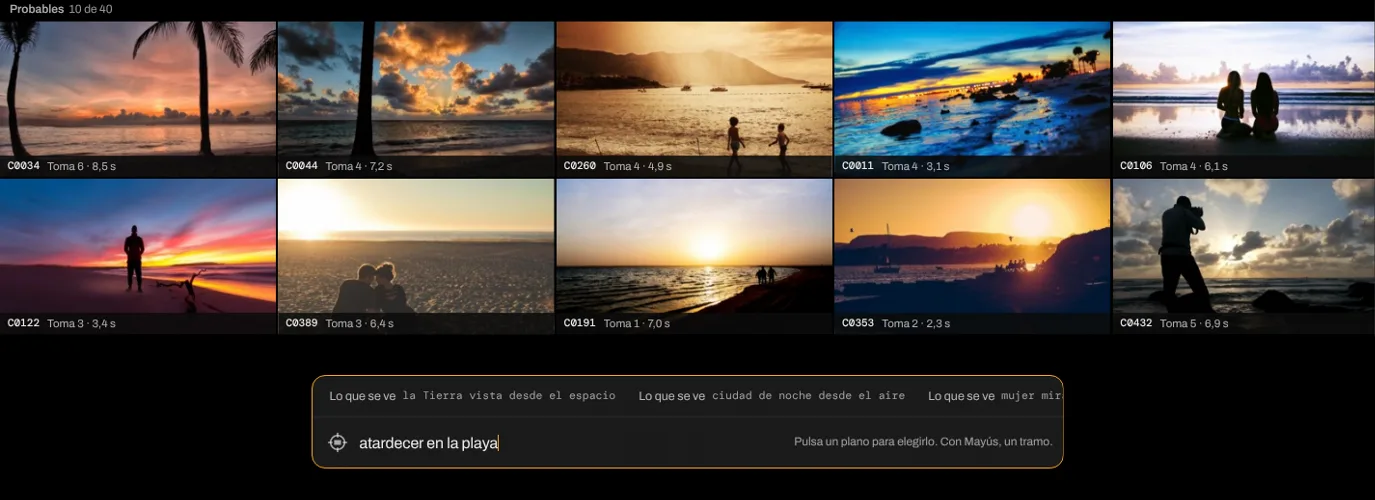
Describe the shot in your own words, the way you'd ask your assistant. Every result tells you how sure it is, so you check the sure ones first. Click to select; hold Shift for a range.
- Sure
It read it on screen, heard the exact phrase, or you confirmed the person.
- Likely
It looks like what you're after, or the folder has that name.
- Possible
Worth a look before you choose.
Levels, not percentages. Anything below the minimum isn't shown.
More ways to search
Can't remember how it looked?
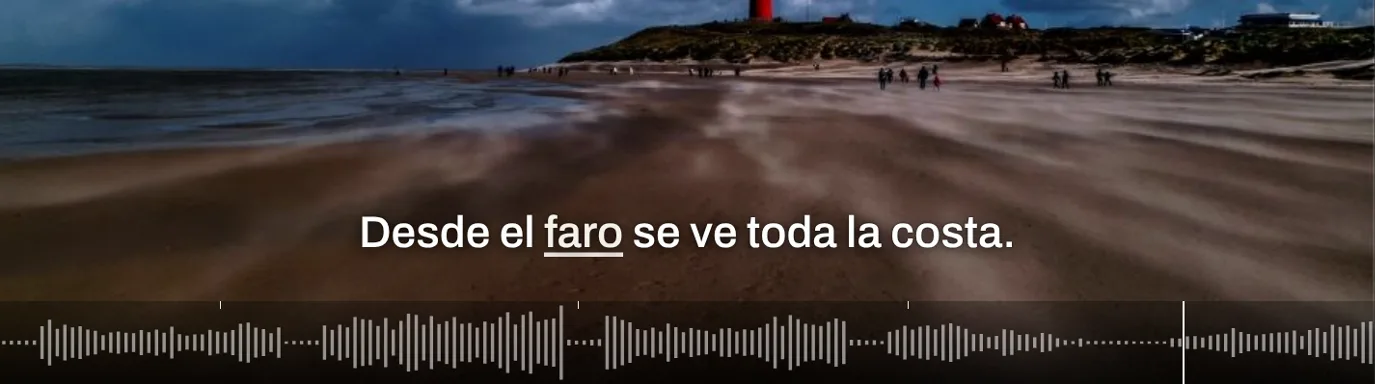
What was said
It transcribes the audio on your Mac and jumps to the exact moment of the phrase.
What was written
It reads signs and titles. If it saw the words, the result is sure.
Who's in it
Name a face and it suggests that person's other takes. Off until you turn it on.
By name
It also searches folder and file names.
By the light
Five filters: outdoor, night, very dark, with people and with text.
How it works
From the drive to the timeline.
Index without worry
Point it at your drives and TakeHunt analyzes the footage. You can search while it indexes, pause and resume without redoing work. It skips editor caches.
Search by take, not by file
It detects cuts and splits each clip into takes. Hover to scrub through one; double-click to view it large with J, K and L.
Send it to Resolve
With DaVinci Resolve Studio open, it builds the timeline and adds markers. It respects camera timecode, Sony's included.

DaVinci Resolve
Works with the version you have.
Searching, viewing and selecting don't need Resolve open. Direct send, with a timeline and markers, needs Resolve Studio. You can also export an .fcpxml with the takes and import it yourself, without markers.
| Feature | Free Resolve | Resolve Studio |
|---|---|---|
| Search, view and select takes | Yes | Yes |
| Direct send with timeline and markers | No | Yes, tested on 21.0.4 |
| Panel next to Resolve | No | In testing |
And also
Everything stays on your Mac.
The analysis happens on your machine, so it works for client footage and NDA shoots too.
- Your videos
- Stay put
- The analysis
- Stays put
- Telemetry
- None
The only things that use the internet
- It downloads the transcriber once (648 MB) and checks every file before using it.
- Activating the license sends only the key.
- With a subscription, it checks it from time to time; it works offline for up to 30 days.
- Once a day it checks for a new version without sending any footage. You can turn it off.
Tech specs
What you need.
- Mac
- With Apple Silicon (M1 or later). It doesn't run on Intel Macs.
- macOS
- 14 Sonoma or later.
- Memory
- 16 GB recommended if Resolve runs on the same Mac.
- Storage
- About 85 MB per indexed hour, plus the 648 MB transcriber, downloaded once.
- Formats
- MP4, MOV, M4V, MTS, MPG, MPEG, AVI (Motion JPEG) and Blackmagic RAW, with sound. MPG and MPEG can be searched and viewed, but not sent to Resolve.
- Windows
- Not for now.
Pricing
Try it with your own footage.
Analyze all your footage and use up to 50 clips before you pay. The one-time license covers two Macs at once; the subscription, one.
One-time payment
19USD
- The license never expires.
- Updates included.
- For two Macs at once.
Subscription
4.50USD a month
- Works offline for up to 30 days.
- Stop paying and nothing is deleted: you keep using 50 clips.
Free trial with up to 50 clips
Download free for MacFrequently asked questions
What is TakeHunt?
TakeHunt is a native Mac app by Simple Studio that finds the take in your footage by what's seen, said and written on screen, and sends it to DaVinci Resolve. All the analysis happens on your Mac.
Does it work offline?
Searching and viewing, yes. Activating the license and the first transcriber download need a connection. The one-time license works offline for up to 90 days; the subscription, up to 30.
Do I need DaVinci Resolve Studio?
Not to search, view and select takes. Direct send to a timeline with markers needs Resolve Studio with external scripting enabled. The other route is to export an .fcpxml and import it by hand: it carries the takes, but not the markers.
Does it always find the take?
Not always. Spoken and written words show up if they were transcribed or read correctly. Image search shows the closest matches even when the subject isn't in your footage, so it's worth checking.
Is it suitable for footage under NDA?
TakeHunt doesn't upload your footage anywhere. If your contract asks for more, such as encryption or working offline, check with whoever signed it.
Is there a Windows version?
Not for now, and there's no date. If you want it, email soporte@takehunt.com with the subject «Windows» and we'll let you know if it launches.
Are there refunds?
No. That's why you can analyze all your footage and use up to 50 clips before paying, to make sure it works for you.
How much is it?
19 USD one-time, for two Macs and with no expiry, or 4.50 USD a month, for one Mac. You can try it with up to 50 clips before paying.
A product from the Simple Studio lab.
TakeHunt grew out of our own editing work. See the rest of what we build.
DaVinci Resolve and Blackmagic RAW are trademarks of Blackmagic Design. Mac and macOS are trademarks of Apple. TakeHunt is independent and not affiliated with Blackmagic Design. The screenshots come from the demo on takehunt.com, with CC0 and public-domain sample images.