
Hablaki for Mac and Windows
Speak. Hablaki types.
Press a key, speak naturally and the text appears where your cursor is. In your email, WhatsApp, Word or ChatGPT.
How you dictate
One key. Your voice. Done.
No windows, no extra steps. Hablaki appears when you call it and disappears when you're done.
Press your key
F5 or fn on a Mac; F9 or right Ctrl on Windows. You can change it to any key you like.
Speak naturally
The way you'd say it to someone. Press once to start and again to finish, or hold it while you speak.
The text appears
Right where your cursor is, in whatever app you have open. No copying, no pasting.
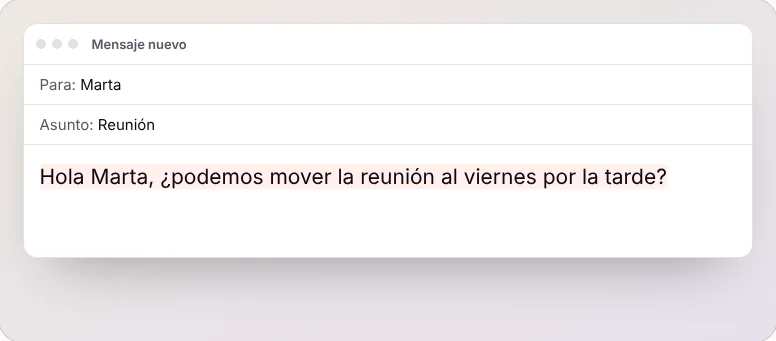
You say“hi marta can we move the meeting to friday afternoon”
Hablaki types“Hi Marta, can we move the meeting to Friday afternoon?”
Recreated demo from hablaki.com.
Say it, and it's already written.
<1s
On a Mac with Apple silicon, a few seconds of speech are typed in under a second.
6languages
Spanish, English, French, Portuguese, German and Italian.
2computers
One license covers two computers, Mac or Windows.
Where you already write
If it has a text box, you can talk to it.
Email, chats, documents, AI, project tools or code. Hablaki types into whatever app is in front of you, with no integrations or extensions.
Email and chat
- Gmail
- Outlook
- Telegram
- Slack
- Teams
Documents and notes
- Word
- Google Docs
- Notion
- Apple Notes
- Pages
- Obsidian
Artificial intelligence
- ChatGPT
- Claude
- Gemini
- Perplexity
- DeepL
Code and projects
- VS Code
- Cursor
- GitHub
- Jira
- Linear
- Trello
Some of the apps where it works. Trademarks belong to their owners; Hablaki is not affiliated with any of them.
Made for writing the way you speak
Everything you need. Nothing in the way.
Your key, your way
Press it once to start and again to finish, or hold it while you speak. Prefer another key? Change it.
Your language, your words
Six languages. Add names, brands and terms from your work so they're spelled right the first time.
Lives in the menu bar
It opens no windows. A discreet indicator tells you when it's listening.
Works offline
Turn off Wi-Fi and keep dictating. It only needs a connection to download the voice model and check the license.
Transcribes files too
Turn recordings, meetings and voice notes into text, with no limit on length or number.
And also
Your voice stays on your computer.
Recognition happens on your own machine. There's no account to create, and what you dictate doesn't go through any server.
- Your voice
- On your device
- Account
- Not needed
- Subscription
- None
Specifications
What you need to use it.
- Mac with Apple silicon
- M1 or later, with macOS 15 or newer.
- Intel Mac
- macOS 13 or newer.
- Windows
- Windows 10 or 11, 64-bit.
- Voice model
- Downloaded once: 460 MB on Apple silicon Macs and 480 MB on Intel and Windows. A 145 MB light option is available.
- Languages
- Spanish, English, French, Portuguese, German and Italian, with your own vocabulary.
- Key
- F5 or fn on Mac; F9 or right Ctrl on Windows. It can be changed.
- License
- Lifetime, for up to 2 computers (Mac or Windows), updates included.
Price
One payment. Forever.
You pay once, if you like it after the trial. No fees, no account, no surprises.
Hablaki · one-time payment
9.99USD
- Lifetime license for up to 2 computers, Mac or Windows
- Updates included, for life too
- No subscription and no account
- Refund within the first 14 days
Many dictation apps
60payments in five years
- They charge every month, for as long as you use them
- And keep charging after year five
Try it free for 14 days, no card.
Download for freeFrequently asked questions
How much does it cost?
9.99 USD, a single payment. It includes a lifetime license for up to two computers, Mac or Windows, plus updates. You can try it free for 14 days first, no card.
Does it work on Windows?
Yes. Hablaki works on 64-bit Windows 10 and 11, and on Macs with Apple silicon or Intel. The same license covers both systems.
Which apps can I dictate into?
Any app with a text box: email, WhatsApp, Word, Google Docs, Notion, ChatGPT, Slack, your code editor and many more. The text appears where your cursor is.
Which languages does it understand?
Spanish, English, French, Portuguese, German and Italian. You can add names, brands and terms so they're spelled correctly.
Does it need internet?
Only to download the voice model the first time and to check the license. After that you can dictate offline.
Does it transcribe recordings?
Yes. The app transcribes audio files, such as meetings or voice notes, with no limit on length or number. If you just need to turn one recording into text, hablaki.com also has a free transcriber in beta.
What if I don't like it?
You can ask for a refund within the first 14 days after purchase.
Is there a phone version?
Not yet. Today Hablaki is for Mac and Windows; phones are in the plans.
There's more in the lab.
Hablaki is one of the products we make at Simple Studio. See the rest on the shelf.
The demo is a recreation taken from hablaki.com. The trademarks mentioned belong to their owners.